How I run coding agents locally
Letting agents do the legwork without letting go of the result
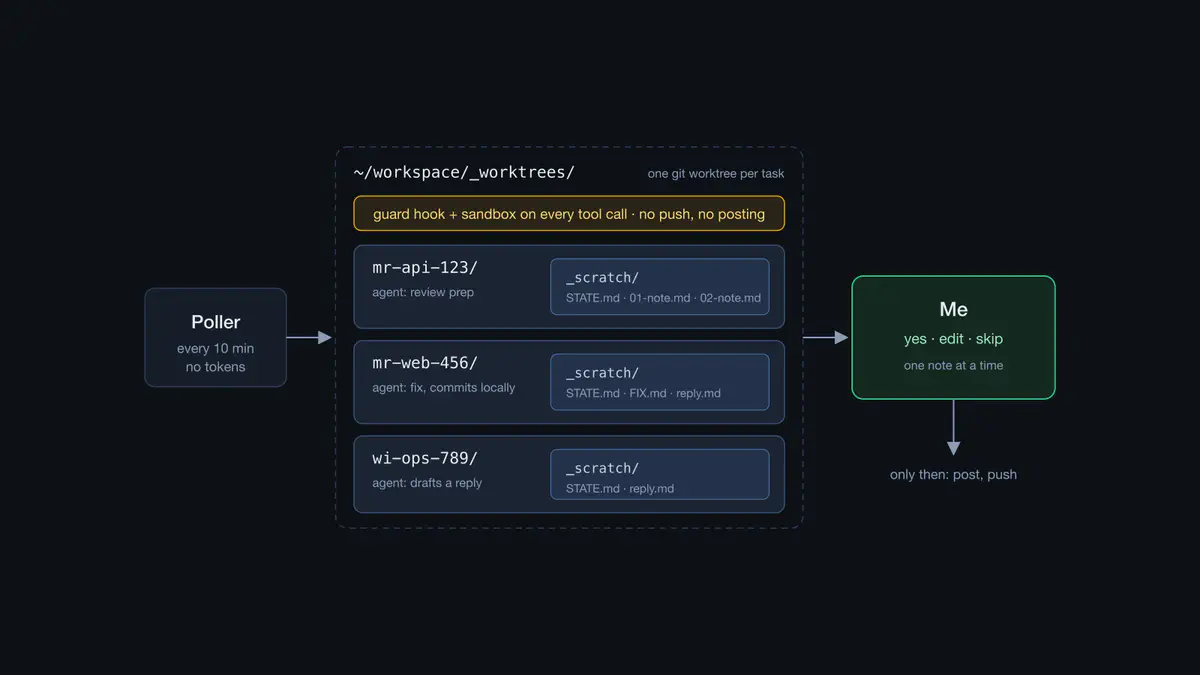
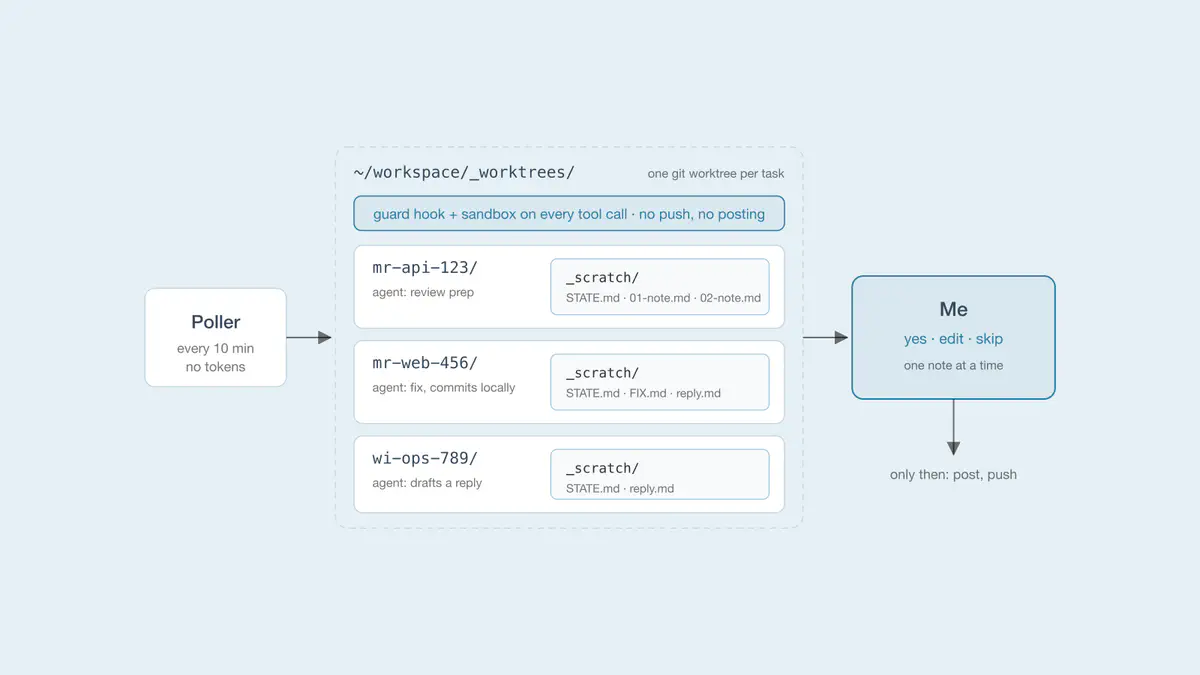 A poller finds work, an agent prepares it in the task’s own worktree, and nothing leaves until I approve it
Most of my day is merge requests: reviewing other people’s, getting my own through review, answering threads, chasing pipelines. In mid-October I started letting coding agents do the first pass on all of it, in the background, on my own machine. This post is how that setup works, what broke, and what I learned along the way.
The rule the whole thing hangs on: the agents prepare, I decide. An agent can read anything, draft a review note, write a fix and commit it locally. It can’t post a comment, push a branch, or resolve a thread. Each of those waits for my yes.
Outline
The loop
The setup is a handful of Python scripts around Claude Code run headless (claude -p):
- A poller runs every 10 minutes from launchd. It fetches my queue from the forge’s API (reviews requested, my open merge requests, threads waiting on me, mentions) and diffs it into one JSON state file. No model calls, no tokens.
- For each item that changed, it decides whether an agent should run. A fingerprint of the item’s state (whose move it is, which threads wait on me, whether the pipeline failed) must differ from what the last run handled. Timestamps don’t count, because my own pushes move them.
- Holds and caps stop it from spending money on noise: a cooldown after a fix, one run per item at a time, a daily cap per run type, and nothing while a bot reviewer is still working.
- A run is one
claude -pin that item’s own folder. It writes everything it produced into files: a briefing, numbered draft notes, a state file with what it checked and what’s left. - A menu bar app (SwiftBar) shows one row per item: what I need to do, plus “Next:” when a draft is ready. Clicking it opens the agent’s session, and there I read, edit, and say yes or no, one note at a time.
Choose models wisely
Two things cost money in a setup like this: a big model on a small job, and a long session dragged along into every follow-up. Both showed up in the logs in the first week.
- Pick the model by the size of the diff. One day, eight of nine reviews touched one to four files, and running the largest model on each cost about $1.33 a review: more model than diffs that size need. Now small diffs (four files and 250 lines at most, or docs only) get the mid-size model, and only big diffs get the largest. Triaging mentions uses the smallest model, and many “Next:” hints come from a fixed rule, with no model at all.
- Don’t run when nothing changed. The poller itself makes plain API calls and spends no tokens, and the fingerprint, cooldown and caps above keep a quiet merge request from waking an agent every ten minutes.
- Compact before resuming. A follow-up run continues the item’s existing session, so it doesn’t re-read the code from scratch. But every resumed turn pays for the whole conversation it carries: resuming one 8.7 MB session for a single small fix cost $4.79. So the size of the session decides what happens next:
- Under 1 MB, the run resumes it as it is.
- Between 1 and 20 MB, it first runs
/compactwith an explicit list of what to keep (every decision and why, each draft’s path and whether it was posted, commit SHAs, each thread’s status, what’s left) and what to drop (raw tool output, file contents, diffs: they can be read again), then resumes in the same conversation. The list has to be explicit: in a test, a code word I didn’t list was gone after compaction. The summary and the path to the full transcript go to_scratch/HANDOFF.md, so nothing is lost. - Over 20 MB, it starts fresh and reads
_scratch/STATE.mdinstead.
- Never resume my own sessions in the background. That $4.79 run was in one of my conversations, and it wrote its output into it, too. Background runs now only continue sessions they started. When I worked on something myself, they start fresh and read the state file.
One task, one folder
Every merge request or issue gets its own folder under ~/workspace/_worktrees/, named by type so a listing groups them: mr-<repo>-<id>, wi-<repo>-<id>, adhoc-<repo>-<topic>.
Why not just work in my normal clones? Two things bit me early:
- My main checkouts hold local-only work, branches with commits that exist nowhere else. An agent that runs
git checkoutthere moves my HEAD out from under me. - A checkout has one HEAD. Two agents sharing one silently read each other’s branch. Git reports no error, and the agent reasons, plausibly and wrongly, about code that isn’t in its merge request.
So each task gets a git worktree: its own checkout, index and HEAD, while sharing the clone’s objects and refs. Twelve tasks cost twelve checkouts, not twelve clones.
Version one: the repo inside the task folder
My first layout put the worktree one level down:
mr-repo-123/
  repo/       ← git worktree
  scratch/    ← drafts, STATE.md, notes
  CLAUDE.md   ← "@repo/CLAUDE.md", so the agent still sees the repo's instructions
  .claude/    ← symlinks to the repo's skills
The appeal was safety: scratch/ sat outside the worktree, so no git command could touch it. It cost me two workarounds (the CLAUDE.md import and the symlinks, because Claude Code looks for those in the session’s folder, not below it), and one thing I couldn’t work around: the desktop app’s diff pane runs git in the session’s folder. The task folder wasn’t a repo, so the diff pane stayed empty. Watching what an agent changed is the whole point of a review setup.
What other people do, and what each costs
Before changing it I looked at what others had settled on. Conductor keeps notes in a gitignored .context/ inside each worktree. repoyard puts an untracked folder around the repo, because “.gitignore is a promise, not a guarantee”. No standard exists, and each option gives something up:
| Where the notes live | Good | Costs you |
|---|---|---|
| Beside the worktree (my version one, repoyard) | no git command can touch them | the session folder isn’t a repo: empty diff pane, the repo’s agent instructions need workarounds |
Inside, hidden by .git/info/exclude (Conductor’s approach, my version two) | diff pane and agent instructions just work; nothing committed | git clean -x deletes them; git worktree add and remove need helpers |
Inside, in the repo’s .gitignore | no per-clone setup | a commit to every repo, so your team sees your tooling |
| Inside, as a dot-folder | out of the way | hidden in Finder, ls and the Claude file pane |
| Symlinked in from outside | survives git clean | Claude Code checks the link’s target, so writes can prompt for permission |
Version one was the first row. I moved to the second.
Version two: the worktree is the task folder
mr-repo-123/          ← git worktree, and the session's folder
  _scratch/           ← drafts, STATE.md: hidden from git
  _shared -> ../_shared   ← per-repo notes shared across tasks
  (the repo's files, its own CLAUDE.md and .claude/)
The repo’s own instructions and skills now load without any import or symlink, and the diff pane works. The interesting part is keeping _scratch/ out of git without touching the repo:
- Git checks three ignore sources:
.gitignore(committed, shared with the team), your globalcore.excludesFile, and.git/info/exclude, which is local and can never be committed. - A linked worktree has no
.git/folder, just a.gitfile pointing into the clone’s.git/worktrees/<name>/, which holds only HEAD and the index. - Everything else,
info/included, lives in the clone’s common dir, so every worktree of a repo reads the sameinfo/exclude. - Writing
/_scratch/there once per repo hides it in every task folder: not ingit status, not in the diff pane, not ingit add -A.
git check-ignore -v _scratch/STATE.md names the exact rule doing it, which is how I checked.
Why _scratch and not .scratch? Finder, ls and the Claude desktop file pane all hide dot-folders, and drafts are what I open most. The underscore also sorts it to the top in Finder and VS Code. Not in ls, though, which sorts by byte value and puts README.md first.
The sharp edges
Moving inside the worktree swapped one set of problems for another. These are the ones I hit:
git clean -fdxdeletes_scratch/.-xremoves ignored and excluded files too. Agents run this when a build gets confused, so a hook now blocks-xand-Xin task folders. It still allows a dry run, and-e _scratch(git honours-eeven with-x).git worktree addrefuses a folder that isn’t empty. A task folder often exists before its worktree, with notes already in_scratch/. The helper moves the folder’s entries aside, adds the worktree, and moves them back. It moves the entries rather than renaming the folder, so an agent already running in it keeps a valid working directory.git worktree removerefuses while ignored files exist.git statuscalls the folder clean,removecalls it dirty. The cleanup archives_scratch/first, then removes the worktree.- Git hooks export
GIT_DIR. My first commit of this change failed: the pre-commit tests rangit -C <temp repo>, and the inheritedGIT_DIRpointed them back at the repo being committed. The tests now stripGIT_*first.
Guarding the agents
Headless agents get no prompts, so they need hard walls. Every background run starts with a settings file that adds two layers:
- A PreToolUse hook on every tool call, built on allowlists, not denylists. The forge CLI and git get read-only subcommands only; there’s no push and no remote change.
WriteandEditreach only the task’s_scratch/and a shared notes folder. A fix run can additionally edit and commit inside its own worktree, and nowhere else. The hook resolves symlinks before checking a path, so_scratch/../Dockerfiledoesn’t slip through. Its self-test runs on every commit. - The OS sandbox for shell commands: writes only to the working folder and a few caches, network only to the forge and package registries, and no reads of
~/.ssh, cloud credentials or kubeconfig.
My own interactive sessions get lighter hooks that ask rather than block:
- one asks before any write to the forge, whatever the allowlist says;
- one lets a push to my own branch through without a prompt and asks for everything else (protected branches, force pushes, branches with someone else’s commits);
- one blocks the
git clean -xabove.
Files over memory
The design decision I’d keep above all: an agent’s memory is its files, not its conversation. Every task has a _scratch/STATE.md with decisions and why, what’s done, what’s left, and open questions. Each run reads it first and updates it last. A later run, a resumed session, or I can pick the task up cold.
Drafts are one file each, revised in place; older versions move to _scratch/history/. A note is posted from its file, so my last-minute edit ships exactly as written, and the record of what was drafted, edited and posted stays next to the code it’s about.
Lessons learned
If you run agents locally, these are the parts that paid for themselves:
- One worktree per task, never your main checkout.
- Make the worktree the session’s folder. Tools assume it, and fighting that costs more than the
git cleanrisk. - Hide agent files with
.git/info/exclude, not the repo’s.gitignore: it’s per clone, shared by all its worktrees, and never shows up in a merge request. - Allowlist what headless agents can do, and test the guard like code.
- Put the human at the edge, not in the loop. Agents run without asking; anything that leaves the machine waits for a yes.
- Make files the source of truth, so no task depends on a session’s memory.
Next steps
- Isolation beyond files. A worktree keeps each agent’s files apart, but the agents still share ports, databases and credentials. That’s fine for reviews and small fixes. Once an agent needs to run services, I expect to need a container per task, and I haven’t worked out where that line is.
- Review load. Agents make drafts cheap, so the bottleneck is now reading: mine first, before anything goes out, then the author’s, when a note lands on their merge request. I post one note at a time, and only after I’ve read it, so nothing goes out unread. Next I want to find out whether that pace works for the people on the other end, or whether I’ve only moved the pile from my desk to theirs.

Grigoris Thanasoulas
Platform Engineer @GitLab
MEng Electrical & Computer Engineering, ECE NTUA
I’m a Platform Engineer with 6 years of Kubernetes and cloud infrastructure experience, most recently at GitLab, and an MEng in Electrical and Computer Engineering from the National Technical University of Athens. CKS‑certified, with a strong software engineering foundation and a focus on reliable, cost‑efficient platforms.